
Wouldn’t it be amazing to have immediate access to the wisdom and expertise of your friends when you need it the most?
Meet Wajam – a new search engine that serves up search results from what is shared among your social networking friends.

Ever since Facebook launched the social sharing Like button in April of 2010, there has been a great deal of anticipation about what that social component would do for search. Regrettably, thus far it has been a waiting game.
In the meantime, Google has stepped up their efforts to go social with the Google+1 button taking on Facebook Like.
And just a few days ago Google introduced the Google+ social network to take on Facebook itself.
Why all the activity with regards to social and sharing?
You guessed correctly. It’s all about search. HADG2EH76FW4
Social is the Future of Search – But it’s Complicated
When it comes to search results, Google and Bing favor different types of content – especially when it comes to social content, which is arguably the most relevant.
Blekko is one search engine that has recently put a spotlight on this situation by challenging the two search giants (who control 95% of the search chess board) to a side-by-side comparison against Blekko’s results via their 3 Engine Monte competition.
The reason the results vary is due to the type and quantity of social data that Google and Bing can respectively index, due to such factors as social permissions.
To give you a better understanding of this, here’s a detailed article published yesterday on social search and social graphs as it relates to Google and Bing – and why it is indeed complicated.
Wajam is Your Friend that Plays Well with Google and Bing
While Google and search partners Bing and Facebook continue to escalate their quest to dominate the entire social media universe, Wajam is ready here and now to help you access the knowledge and wisdom of your friends – that narrow sliver of search you often know to be the most relevant and useful.
Wajam is a browser extension that works in tandem with the major search engines, so you don’t have to change your search habits to get the results you are looking for. All you have to do is give Wajam the same permissions that you have given Facebook and Twitter, and it does the rest.
That’s the beauty of Wajam. You and your friends have previously granted each other access to data via shared links. By granting Wajam access to that same, you can now search the word-of-mouth recommendations your friends are making every day on the social networks.
How Wajam Works
On Facebook, Wajam has access to content that you and your friends have shared. This includes any links from Facebook to the open web, as well as content that originated outside of Facebook, such as videos and images you have uploaded.
Wajam does not share content from friends of your friends, as that is against Facebook’s privacy settings. However, you should know that when you Like content on the open web, you have friended that site, and Wajam therefore considers any content from it to be highly relevant.
Unlike Facebook, Twitter is a public site. So, Wajam delivers results from your friends – and friends of friends, what you know of as your followers.
Here is an example of Wajam results delivered within a Google Search. Below the Wajam results are the usual Google results.
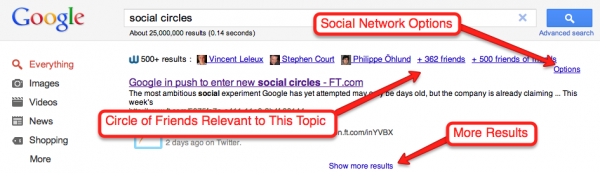
You can click on options to dial up Twitter or Facebook results, and you can display results shared by specific friends.
Let’s take a look at a specific example to illustrate how Wajam can work for you.
Making Wajam Work for You
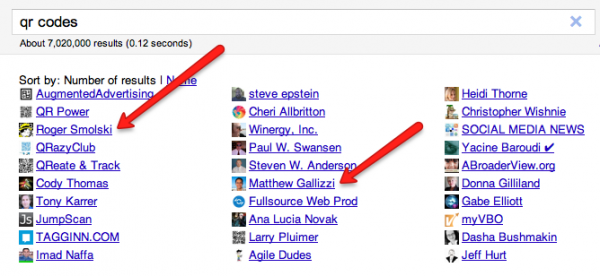
I’m in the process of writing an article on QR codes to follow up on a highly popular one written earlier this year entitled How You Can Grow Your Business with QR Codes. For that first article I interviewed Steve Epstein, who is now in my social circle. That article introduced me to Roger Smolski and Matthew Gallizzi, who I’ve interviewed for the follow up piece I’m working on.
If I Google QR codes and click on Friends from within the Wajam results, I can easily get a glance of others within my social networks that have shared information on QR codes, thus making them valuable resources for my project.
There is much more to Wajam than I can’t show you here. The best way to find out how it can work for you is to give it a try.
What are the projects you are working on where you could benefit most from the recommendations of your friends?
Leave a comment below or share this with your social community on Facebook, LinkedIn, Twitter, or Stumbleupon.
Enjoy your weekend, Jeff